
Navigation Updates
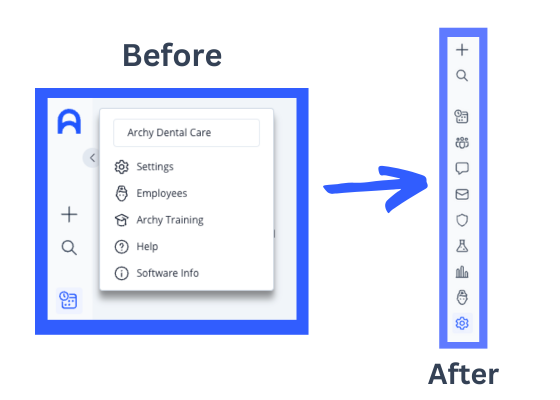
Settings and Employees sections of Archy have moved from under the practice logo menu to the main left-hand navigation bar.
--------------------------------
Customizable Route Slips
.gif?width=1120&upscale=true&name=Print%20Route%20Slip%20Instructions%20(1).gif)
We heard you! Now you can print route slips with ease. Print a route slip for any appointment, or even multiple appointments at once from the Huddle view.
Want to personalize the information on your route slips? Simply head to Scheduling Settings to customize your slip. Add smart variables to automatically fill in patient details, insurance information, appointment specifics, and more for each route slip you generate. Learn more.
--------------------------------
Adjustments by Provider
Tracking adjustments just got simpler! You can now easily attribute production and collection adjustments to the correct provider. Simply go to the Total Production and Collection Adjustments Report and select "Show by Provider" for a detailed breakdown. Plus, you can filter by individual provider — perfect for factoring adjustments into production or collection pay formulas.
Learn how you can start attributing adjustments to the correct provider here.
--------------------------------
Employee Schedules
.png?width=564&upscale=true&name=image%20(1).png)
We're excited to continue working on improvements that give you more control over your scheduling. As a first step, staff with Employee Management permissions can now easily access the Employees section of Archy from the main left-hand navigation and set working hours and days off for all employees—whether they are providers or not.
These updates lay the groundwork for a smoother, more efficient scheduling experience. Stay tuned for the upcoming release of Schedule Templates, a powerful new feature that will let you define the types of appointments that can be scheduled for specific time blocks on a provider’s calendar.
--------------------------------
CDT Codes Updated for 2025
The CDT code updates for 2025 have been made available in Archy. You can begin scheduling any 2025 appointments with these new and updated codes immediately. Any codes expiring in 2025 have been noted and are still available to use for 2024 appointments.
--------------------------------
Post Appointment Texts
Auto texts that go out after an appointment is complete can now be scheduled for a specific time of day.
.png?upscale=true&width=800&upscale=true&name=Untitled%20design%20(2).png)
Additional Updates
Day-to-day:
➡️Fixed a bug preventing Archy users from editing custom codes that started with the letter "D."
➡️Code D2962 now required to indicate if the veneer was an initial or replacement to support the claims process.
➡️Fixed a bug allowing employees with Clinical permissions to adjust Image Settings.
➡️Search bar added to settings for easier navigation.
➡️The Patient Information form will now always require that the patient provide their address.
Charting:
➡️In charting, "Master Tx Plan" is now "All Procedures", "Neg Fee" is now "Neg Rate", and "Ins Est" is now "Pt Est".
➡️A bug impacting the ability to view all treatment plans if the total amount of the treatment plans was greater than 20 has been fixed and now you are able to scroll the entire list.
➡️A bug impacting the ability to assign up to 3 teeth for procedure code D4342 has been fixed. Up to three teeth are now able to be saved for this code.
➡️A bug impacting the ability to clear the clinical filter automatically applied when opening a patients notes from the chart has been fixed. This filter will still be automatically applied on open of the notes from the chart, but it can now be removed by clicking the "X" or "Clear" so you can see all the notes on a patient from the chart.
➡️You now have the power to view and edit clinical notes that were created with archived templates.
➡️Select from priority level 1 - 20 rather than the previous 1 - 10.
➡️A bug was fixed impacting your ability to select if more than one tooth on several procedures was fixed. Now, procedures that allow for multiple teeth to be selected will properly save all selected teeth.
Collections and Claims:
➡️Online booking will no longer display out of network if you turned off insurance collection in your booking settings.
➡️DentalXChange will flag a claim as "Duplicate" if the patient information and date of service match a claim submitted within 10 days, regardless of the insurance plan being different. You must log into your DentalXChange account and select "Remove Duplicate" in order to fully submit the claim. Since it is submitted in DentalXChange, it will be marked as "Sent" in Archy along with a warning about it being a duplicate, rather than stuck in "Draft".
➡️Fixed a bug for if the assignment of benefits is set to "Patient." It will automatically default to "Patient" instead of "Practice."
Scheduling:
➡️Fixed a bug with permissions and route slips. Now all users have access to print a route slip from an appointment or huddle.
➡️Route slips smart tags for "Appointment Scheduled Treatments" or "Next Appointment Procedures" now include tooth number and surface, if applicable.
Imaging:
➡️Fixed a bug that updated internal logic for Imaging AI measurements. If you have custom calibrated your sensor, PearlAI will use those measurements. If you have not custom calibrated your sensor, PearlAI will use its calculated measurements.
Comments
0 comments
Please sign in to leave a comment.